Installing Invictus Dashboard
- Prerequisites
- Download
- Deploy
- First-time sign-in
To access the resources stored on Azure Storage and Azure Container Registry you have to request an SAS-token and ACR Password from coditproducts@codit.eu.
We use Multiple Revision mode in our Container App deployments, which means that older revisions could clutter the Container App Environment. We provide a clean-up script that should be run after logging in on the correct subscription, but can be ran in Azure DevOps Pipelines as well.
Include VNET support Shared
Invictus includes functionality which allows all its resources to run within an Azure Virtual Network (VNET).
Required deployment
-
An Azure Virtual Network
- Including two subnets, one each for:
- Private Endpoints
- Container App Environment
- The subnets must have the following services enabled
Microsoft.AzureCosmosDBMicrosoft.EventHubMicrosoft.KeyVaultMicrosoft.ServiceBusMicrosoft.Storage
- The Container App subnet must also have the delegation
Microsoft.App/environments
- Including two subnets, one each for:
-
Private DNS Zones (Bicep template)
privatelink.azurecr.ioprivatelink.blob.core.windows.netprivatelink.file.core.windows.netprivatelink.mongo.cosmos.azure.comprivatelink.queue.core.windows.netprivatelink.servicebus.windows.netprivatelink.table.core.windows.netprivatelink.table.cosmos.azure.comprivatelink.vaultcore.azure.netprivatelink.{regionName}.azurecontainerapps.io
-
To be able to deploy the app code from an Azure DevOps pipeline you will need a self hosted agent running on the same VNET with the following software installed:
- Powershell
- Azure Powershell
- Bicep CLI
Required role assignment
If the Invictus resources and the VNET are on different resource groups, then the Invictus resource group will need to be assigned the role of Network Contributor onto the VNET resource group.
Migrate from older installations
Migrate to Dashboard v2+
Build pipeline
The Azure Blob Storage container for Dashboard V2 is now dashboard-v2, this can be updated in the -StorageContainerName parameter you use in the build pipeline.
Release pipeline
Make sure that the PowerShell script in the release pipeline which runs Deploy.ps1 has the following parameters:
azurePowerShellVersion: LatestVersion
pwsh: false
Object ID update
When upgrading to Invictus V2, the devOpsObjectId parameter which is passed to the release pipeline should be updated. This must be changed to the Enterprise Application Object ID of the service principal thats connected to the DevOps service connection (not of the App Registration). This change is required for both Dashboard and Framework pipelines.
Remove existing role assignments
Invictus V2 includes functionality to automatically deploy role assignments which were previously set manually. However, if these role assignments are already present, they will cause a conflict. In your Invictus resource group, remove any roles which are assigned to the Azure Functions. Typically, this is just 1 role assignment:
- Monitoring Contributor rights for the FlowHandler component for the Invictus resource group.
Microsoft Entra ID setup
If your Invictus installation integrates with Microsoft Entra ID, please follow the Microsoft Entra ID setup guide to update your app registration, or set up a new one with the appropriate settings required for Invictus V2.
SQL data migration
Invictus V2 includes functionality to migrate the SQL data from your previous installation into the Cosmos DB of the new version. Data relating to users, groups and the folder and flow structure will be migrated. Flow traces will not be migrated.
Data migration release pipeline changes
The data migration process forms part of the release pipeline. Please refer to Dashboard release pipeline installation step for more information. The deploy script parameter PerformSqlDataMigration must be set to 1. The deploy script also accepts a few optional parameters to be able to connect to your SQL database:
-sqlToMigrateServerName: Server name hosting the SQL DB you wish to migrate. Defaults toinvictus-{ResourcePrefix}-sqlsvr-sqlToMigrateDBName: Name of the SQL DB you wish to migrate. Defaults tocoditcip-sqlToMigrateUserName: The login username used to connect to the SQL Server. Defaults toInvictusFrameworkAdmin
In addition to these values, the SQL server password must be stored as a secret in your Invictus Azure Key Vault with the name invictussqlserverpassword.
The data migration will now run as part of your release pipeline. The resultant data in Azure Cosmos DB will be validated against the original SQL data, with the validation results printed in the release logs. However it is still important to manually verify the migrated data. When complete, you will be able to login to the new Invictus V2 Dashboard with the same credentials as before.
Once you are satisfied with the migrated data, it is advised to change the PerformSqlDataMigration script parameter to 0 so that the migration process is entirely skipped in subsequent releases.
Dashboard URL
The Invictus V2 release pipeline will create a new App Service Dashboard resource with a -v2 suffix e.g invictus-dev-invictusdashboard-v2. This means that the URL of this resource will be used to access the new Dashboard. If instead you wish to maintain your current URLs for the Dashboard, the old Dashboard App Service resource must be deleted from your resource group. Then, pass invictusDashboardWebAppName as a parameter to the release script, passing the name of the app service as a value.
By doing this you will lose access to the old Dashboard and the ability to view and query its historic data.**
Add role assignments
In addition to the Flow Handler component, in V2 also the Dashboard Gateway must have Logic App Contribute access on the resource group or subscription which contains the Logic Apps.
Common migrating issues
If you are passing the servicePlanName or autoscaleForPlanName (or both) parameters to the Dashboard release pipeline, these must be updated by adding -linux to the end of their values (feel free to maintain your own naming conventions). This change is required for the Dashboard pipeline only.
If you have role assignments conflicts during deployment, you might have multiple role assignments defined at the Invictus resource group. This case, remove all role assignments defined at the Invictus resource group level.
Invictus configure dashboard script update
If you are using the PowerShell script Invictus-ConfigureDashboard.ps1 to deploy flows, etc, you must replace this script with the V2 version
To deploy the Invictus Dashboard together with your customer solution, the Dashboard should be included in your release package.
Save installation script to your repository Shared
The Invictus-GetSources.ps1 script will pull the latest Invictus resources needed to deploy the Dashboard.
Add variables to variable group Shared
Secrets are required for authentication. These should be provided to you by Codit Software. Create a variable group for them:
- {prefix}.Invictus.Installation
Invictus.Installation.StorageAccount.Name: invictusreleasesInvictus.Installation.StorageAccount.Dashboard.SasToken: value provided by Codit SoftwareInvictus.Installation.StorageAccount.Framework.SasToken: value provided by Codit Software (if you're also deploying the Framework)Infra.Environment.ACRUsername: value provided by Codit SoftwareInfra.Environment.ACRPassword: value provided by Codit Software
Add YAML build pipeline
Add a YAML pipeline to build the Invictus for Azure Dashboard. Change the following example file according to your needs, for example change the trigger path:
  paths:
    include:
    - /src/customer.azure.invictus
Full YAML build pipeline example
pr: none
trigger:
  branches:
    include:
    - main
    - feature/*
  paths:
    include:
    - /src/customer.azure.invictus

parameters:
- name: Version
  displayName: Invictus Version
  type: string
  default: '*'
- name: useBeta
  displayName: Use Beta
  type: string
  default: $False

pool:
  vmImage: 'windows-latest'

stages:
- stage: Package
  displayName: Package
  dependsOn: []
  variables:
  - group: prefix.invictus.installation
  jobs:
  - job: publish
    displayName: Build and Publish Dashboard
    steps:
    - checkout: self
      clean: true
      persistCredentials: true

    - task: PowerShell@2
      displayName: 'Pull Invictus sources'
      inputs:
        targetType: filePath
        filePath: './scripts/Invictus-GetSources.ps1'
        arguments: >
          -StorageAccountName '$(Invictus.Installation.StorageAccount.Name)'
          -StorageSasToken '$(Invictus.Installation.StorageAccount.Dashboard.SasToken)'
          -StorageContainerName 'dashboard-v2'
          -SaveLocation '$(Build.ArtifactStagingDirectory)'
          -UseBeta ${{parameters.useBeta}}
          -Version ${{ parameters.version }}

    - task: PublishPipelineArtifact@1
      inputs:
        TargetPath: $(Build.ArtifactStagingDirectory)
        ArtifactName: dashboard-v2
        publishLocation: 'pipeline'
Create variable group(s) Shared
Create a variable group (recommended: {prefix}.Invictus.{env}) for each the environments. The deployment uses this variable group and edits/adds variables based on the Bicep deployment output.
Make sure the Project Collection Build Service has Administrator access to these variable groups (Pipelines > Library > Security)
Use Deploy.ps1 script for deployment
The Deploy.ps1 PowerShell script is available in the downloaded Invictus sources and should be used as the main point of contact for deploying Invictus products.
Mandatory Parameters
| Argument name | Description |
|---|---|
arcUsername | The username credential to authenticate the Docker CLI. |
arcPassword | The password credential to authenticate into the Docker CLI. |
resourcePrefix | Prefix used for deployed Azure resources (i.e. invictus-{prefix}-vlt) |
resourceGroupName | Name of Azure resource group where Invictus should be deployed |
variableGroupName | DevOps variable group to write the Bicep outputs to (i.e. Invictus_CosmosDb_DbName) |
azureActiveDirectoryClientId | See Microsoft Entra ID Setup if enabled. |
azureActiveDirectoryTenantId | See Microsoft Entra ID Setup if enabled. |
azureActiveDirectoryClientSecret | See Microsoft Entra ID Setup if enabled. |
azureActiveDirectoryAudience | See Microsoft Entra ID Setup if enabled. |
performSqlDataMigration | If value is 1 the data migration process will run, migrating SQL data to Cosmos DB. If the value is 0, the process will be skipped. See the migration guide for more details. Once data migration has been performed and verified, it is recommended to then set this value to 0 so that the migration process is skipped for all subsequent releases. |
flowDataTTLInDays | Amount of days flow traces can live in the database See import flow traces. |
isProvisionedCosmos | If the value is 1, a Cosmos DB with provisioned throughput will be deployed. If the value is 0, a serverless Cosmos DB will be deployed instead. How to choose between provisioned and serverless. |
identityProviderApplicationId | See Container Authentication. |
identityProviderClientSecret | See Container Authentication. |
useBeta | Indicates the environment of the Azure Container App registry where the deployment gets its container images. |
Optional Parameters
| Argument name | Default value | Description |
|---|---|---|
artifactsPath | $PSScriptRoot | Path on the DevOps agent where the downloaded Invictus artifacts are stored (publish and download build artifacts) |
resourceGroupLocation | 'West Europe' | Azure location where resources should be deployed |
isAdDisabled | False | Boolean flag to indicate whether the Dashboard should use Microsoft Entra ID for authentication |
additionalTemplateParameters | [] | Additional named parameters for the Bicep template you wish to override. More on this below. |
version | latest | Version of the published Invictus artifacts that the deployment should download and deploy on the client environment. |
Full YAML task example
- task: AzureCLI@2
  displayName: 'Azure CLI'
  env:
    SYSTEM_ACCESSTOKEN: $(System.AccessToken)
  inputs:
    azureSubscription: '[YOUR_SERVICE_CONNECTION]'
    scriptType: 'pscore'
    scriptLocation: 'inlineScript'
    inlineScript: |

      # Determine where the the provided Invictus 'Deploy.ps1' script is located
      $artifactsPath = ${{ variables['Pipeline.Workspace'] }} + '/_build/dashboard'
      $scriptPath = $artifactsPath + '/Deploy.ps1'

      & $scriptPath `
        -artifactsPath $artifactsPath `
        -acrPath 'invictusreleases.azurecr.io' `
        -useBeta false `
        -acrUsername 'admin' `
        -acrPassword '<pass>' `
        -resourcePrefix 'dev' `
        -resourceGroupName 'my-client-dev-rg' `
        -variableGroupName 'My.Client.Dev' `
        -performSqlDataMigration 0 `
        -isProvisionedCosmos 0 `
        -azureActiveDirectoryClientId '4b559bfb-871a-4013-bce9-829e3aeb6bdd' `
        -azureActiveDirectoryTenantId '97a944a1-04a0-45d2-b2f3-c424755c4167' `
        -azureActiveDirectoryClientSecret '<pass>' `
        -azureActiveDirectoryAudience 'https://contoso.com' `
        -identityProviderApplicationId 'c84d34ea-f169-4787-a4af-81750debda0b' `
        -identityProviderClientSecret '<pass>' `
        -isProvisionedCosmos 1 `
        -flowDataTTLInDays 90
Full YAML release pipeline example
pr: none
trigger: none

resources:
  pipelines:
    # Name of the pipeline resource inside this workflow. Used to reference the pipeline resources later on (e.g. download artifacts).
  - pipeline: _build
    # Name of the pipeline in Azure Pipelines
    source: 'customer.azure.invictus.dashboard.build'
    trigger: true

parameters:
  - name: "Version"
    type: string
    default: "latest"
  - name: "UseBeta"
    type: string
    default: "$false"

pool:
  vmImage: 'ubuntu-latest'

stages:
- stage: deploy_dev
  displayName: 'Deploy to Development'
  variables:
  - group: infra.dev
  - group: prefix.invictus.dev
  - group: prefix.invictus.installation
  jobs:
  - deployment: deploy_development
    displayName: 'Deploy to Development'
    environment: Development
    strategy:
      runOnce:
        deploy:
          steps:
          - download: '_build'
            displayName: Download Artifact
          - task: AzureCLI@2
            env:
              SYSTEM_ACCESSTOKEN: $(System.AccessToken)
            inputs:
              azureSubscription: 'NameOfYourServiceConnection'
              scriptType: 'pscore'
              scriptLocation: 'scriptPath'
              ScriptPath: '$(Pipeline.Workspace)/_build/dashboard-v2/Deploy.ps1'
              ScriptArguments: '-version ${{parameters.Version}} -useBeta ${{parameters.UseBeta}} -acrPath "invictusreleases.azurecr.io" -acrUsername $(Infra.Environment.ACRUsername) -acrPassword $(Infra.Environment.ACRPassword) -resourcePrefix $(Infra.Environment.ResourcePrefix) -artifactsPath $(Pipeline.Workspace)/_build/dashboard-v2 -resourceGroupName $(Infra.Environment.ResourceGroup) -variableGroupName invictus.$(Infra.Environment.ShortName) -devOpsObjectId "$(Infra.DevOps.Object.Id)" -azureActiveDirectoryClientId "$(Infra.AzAD.Client.Id)" -azureActiveDirectoryTenantId "$(Infra.DevOps.Tenant.Id)" -azureActiveDirectoryClientSecret "$(Infra.AzAD.Client.Secret)" -azureActiveDirectoryAudience "$(Infra.AzAd.Audience)" -identityProviderApplicationId "$(Infra.AzAD.Client.IdentityProviderApplicationId)"  -identityProviderClientSecret "$(Infra.AzAD.Client.IdentityProviderClientSecret)" -performSqlDataMigration 0 -isProvisionedCosmos 0 -flowDataTTLInDays 90 -containerAppsEnvironmentLocation "$(Infra.Environment.ContainerAppsEnvironmentLocation)"'

- stage: deploy_prd
  displayName: 'Deploy to Production'
  dependsOn: deploy_acc
  variables:
  - group: infra.prd
  - group: prefix.invictus.prd
  - group: prefix.invictus.installation
  jobs:
  - deployment: deploy_prd
    displayName: 'Deploy to Production'
    environment: Production
    strategy:
      runOnce:
        deploy:
          steps:
          - download: '_build'
            displayName: Download Artifact
          - task: AzureCLI@2
            env:
              SYSTEM_ACCESSTOKEN: $(System.AccessToken)
            inputs:
              azureSubscription: 'NameOfYourServiceConnection'
              scriptType: 'pscore'
              scriptLocation: 'scriptPath'
              ScriptPath: '$(Pipeline.Workspace)/_build/dashboard-v2/Deploy.ps1'
              ScriptArguments: '-version ${{parameters.Version}} -useBeta ${{parameters.UseBeta}} -acrPath "invictusreleases.azurecr.io" -acrUsername $(Infra.Environment.ACRUsername) -acrPassword $(Infra.Environment.ACRPassword) -resourcePrefix $(Infra.Environment.ResourcePrefix) -artifactsPath $(Pipeline.Workspace)/_build/dashboard-v2 -resourceGroupName $(Infra.Environment.ResourceGroup) -variableGroupName invictus.$(Infra.Environment.ShortName) -devOpsObjectId "$(Infra.DevOps.Object.Id)" -azureActiveDirectoryClientId "$(Infra.AzAD.Client.Id)" -azureActiveDirectoryTenantId "$(Infra.DevOps.Tenant.Id)" -azureActiveDirectoryClientSecret "$(Infra.AzAD.Client.Secret)" -azureActiveDirectoryAudience "$(Infra.AzAd.Audience)" -identityProviderApplicationId "$(Infra.AzAD.Client.IdentityProviderApplicationId)"  -identityProviderClientSecret "$(Infra.AzAD.Client.IdentityProviderClientSecret)" -performSqlDataMigration 0 -isProvisionedCosmos 0 -flowDataTTLInDays 90 -containerAppsEnvironmentLocation "$(Infra.Environment.ContainerAppsEnvironmentLocation)"'
Bicep Template Parameters
| Name | Description | Tags |
|---|---|---|
acaIdentityNamedefault: invictus-${resourcePrefix}-aca-identity | The name of the user-assigned identity that pulls the container images from the Azure Container Registry. | container-apps |
alertingAppInsightsNamedefault: invictus-${resourcePrefix}-alertingappins | The name of the Azure Application Insights resource that holds the alerts which the Dashboard stores for client-created flows. | monitoring |
allowStorageAccountSharedKeyAccessdefault: null | Indicates whether the shared Azure Storage Account allows authentication via a shared key access. | storagesecurity |
appInsightsNamedefault: invictus-${resourcePrefix}-appins | The name of the Azure Application Insights resource that tracks the general telemetry of the Dashboard backend infrastructure. | monitoring |
appInsightsSamplingPercentagedefault: 1 | The sampling percentage for the Azure Application Insights that tracks the general telemetry of the Dashboard. | monitoring |
auditsCollectionThroughputdefault: 1000 | The collection throughput (RU/s) for the audits MongoDB collection in the Azure Cosmos DB resource, used when the Azure Cosmos DB deploys as provisioned. | storagescaling |
azureActiveDirectoryAudience | The allowed audience when the Dashboard interacts with the client's the Microsoft Entra ID during managing Azure Logic Apps alerts. | security |
azureActiveDirectoryClientId | The application ID of the Microsoft Entra ID app registration that facilitates authentication towards the client's Microsoft Entra ID resource, useful when the Dashboard is configured for Microsoft Entra ID signin authentication. | security |
azureActiveDirectoryClientSecret | The client secret of the Microsoft Entra ID app registration that facilitates authentication towards the client's Microsoft Entra ID resource, useful when the Dashboard is configured for Microsoft Entra ID signin authentication. | security |
azureActiveDirectoryTenantId | The tenant ID of the Microsoft Entra ID app registration that facilitates authentication towards the client's Microsoft Entra ID resource, useful when the Dashboard is configured for Microsoft Entra ID signin authentication. | security |
azureWebJobsWorkFlowEventsClearFunctionDisableddefault: truedeprecated since: v6.2, will be removed in v7, clearing happens via Cosmos DB for MongoDB TTL policies. | Indicates whether the Azure Functions timer trigger should be disabled, meaning the Azure Logic Apps workflow Dashboard backend storage won't be cleared. | storage |
cacheImportJobScaling | The Azure Container App scaling options for the cache job. | container-appsscaling |
caeVnetInfraRgNamedefault: invictus-${resourcePrefix}-cae-infra | The name of the Azure Container Apps infrastructure resource group (when VNET is enabled). | container-appsnetworkingvnet |
containerAppEnvironmentSubnetName | The name of the subnet to form the network rules of the Azure Container App environment, useful for VNET deployments. | networkingvnetcontainer-apps |
containerAppEnvironmentSubnets | A list of subnet names to form the network rules of all the Azure Container App resources, useful for VNET deployments. | networkingvnetcontainer-apps |
containerAppsEnvironmentLocationdefault: resourceGroup().location | The Azure location for the Azure Container Apps and their environment. | container-apps |
containerAppsEnvironmentNamedefault: invictus-${resourcePrefix}-cae | The name of the Azure Container App environment. | container-apps |
containerRegistryName | The name of the Azure Container Apps registry that hosts the Dashboard's container images. | container-apps |
containerRegistryUrldefault: ${resourcePrefix}.acr.azurecr.io | The server URL of the Azure Container Apps registry that hosts the Dashboard's container images. | container-apps |
cosmosAccountNamedefault: invictus-${resourcePrefix}-cosmos | The name of the Azure Cosmos DB resource that acts as the main backend storage for the Dashboard. (The deployment ads a suffix | storage |
cosmosDatabaseNamedefault: InvictusDashboard | The name of the singleton database in the Azure Cosmos DB resource that acts as the main backend storage for the Dashboard. | storage |
cosmosDbSubnets | A list of subnet names to form the Azure Cosmos DB for MongoDB resource, useful for VNET deployments. | networkingvnetstorage |
customApplicationIdsdefault: [] | A list of additional IDs referring to custom Microsoft Entra ID applications that should also be able to access the Azure Container Apps hosting the Dashboard. | security |
customTagsdefault: {} | A set of Azure resource tags to apply to all to the deployed Invictus resources. | governance |
dashboardnew since v6.3 | The options to configure the Dashboard web application. | webnetworking |
dashboardGatewayScaling | The Azure Container App scaling options for the Dashboard Gateway backend/back office. | container-appsscaling |
dashboardScaling | The Azure Container App scaling options for the Dashboard web application. | container-appsscaling |
dashboardSettingsCollectionThroughputdefault: 1000 | The collection throughput (RU/s) for the Dashboard settings MongoDB collection in the Azure Cosmos DB resource, used when the Azure Cosmos DB deploys as provisioned. | storagescaling |
dataFactoryEventHubNamedefault: invictus-${resourcePrefix}-df-evhb | The name of the Azure Event Hub for the import job where Azure Data Factory pipeline diagnostic traces are send to. | messagingimporting |
datafactoryReceiverScaling | The Azure Container App scaling options for the import job that imports diagnostic traces from Azure Data Factory pipelines. | container-appsscalingimporting |
dataMergeWorkflowEventHubNamedefault: invictus-${resourcePrefix}-mergeddata-evhb | The name of the Azure Event Hub where the merge job pushes finalized flow traces, where the store job listens. | container-apps |
dbImportJobScaling | The Azure Container App scaling options for the merge job. | container-appsscaling |
devOpsObjectIddefault: deployer().objectId | The object ID associated with the service principal of the enterprise application that the Azure DevOps service connection is created for. | security |
disableStorageAccountPublicNetworkAccessdefault: false | Indicates whether the shared Azure Storage Account should disable public network access. If | storagenetworkingsecurityvnet |
dnsZoneResourceGroupNamedefault: resourceGroup().name | The name of the Azure resource group where the private DNS zone deploys to. | networkingvnet |
dnsZoneSubscriptionIddefault: subscription().subscriptionId | The Azure subscription ID to control the private DNS zone throughout, useful for VNET deployments. | networkingvnet |
enableVnetSupportdefault: false | Feature flag to control whether the Dashboard deploys within a VNET. | networkingvnet |
eventHubAutoInflatedefault: false | Indicates whether the Azure Event Hubs namespace should automatically scale up. More on Azure Event Hubs throughput units. | messagingscaling |
eventHubMaxThroughputUnitsdefault: 0 | The maximum amount of Azure Event Hubs throughput units for the namespace. More on Azure Event Hubs throughput units. | messagingscaling |
eventHubMessageRetentionInDaysdefault: 1 | The amount of days Azure Event Hubs messages will be retained on all the hubs throughout More on Microsoft documentation on Azure Event Hubs properties. | messaging |
eventHubNamedefault: invictus-${resourcePrefix}-evhb | The name of the Azure Event Hub within the namespace that receives diagnostic traces from client Azure Logic Apps with Consumption plan. | messagingimporting |
eventHubNamespaceNamedefault: invictus-${resourcePrefix}-evnm | The name of the Azure Event Hubs namespace resource that acts as the backend event sink system for notifications within the Dashboard backend infrastructure. | messaging |
eventHubNameV2default: invictus-${resourcePrefix}-evhb-v2 | The name of the Azure Event Hub within the namespace that receives diagnostic traces from client Azure Logic Apps with Standard plan. | messagingimporting |
eventHubSkuCapacitydefault: 1 | The limit of the chosen pricing tier of the Azure Event Hubs namespace. More on Azure Event Hubs quotas and limits. | messaging |
eventHubSkuNamedefault: enableVnetSupport ? 'Standard' : 'Basic' | The pricing tier of the Azure Event Hubs namespace that acts as the backend event sink system for notifications within the Dashboard backend infrastructure. | messaging |
eventHubSubnets | A list of subnet names to form the Azure Event Hubs namespace resource, useful for VNET deployments. | networkingvnet |
flowActivityIntervalInMinutesdefault: 55 | The time period threshold (in minutes) to update the active flow traces watermark during finalizing pending flow traces in the merge job. | monitoring |
flowBlobArchiverFunctionCrondefault: 0 0 */3 * * *deprecated since: v6.2, will be removed in v7, clearing happens via Cosmos DB for MongoDB TTL policies. | The CRON expression that represents the time period in which flow trace information is archived. | storage |
flowDataCollectionThroughputdefault: 2000 | The collection throughput (RU/s) for the flow traces MongoDB collection in the Azure Cosmos DB resource, used when the Azure Cosmos DB deploys as provisioned. | storagescaling |
flowDataTTLInDays | The maximum amount of days the flow traces stay remain in the Dashboard backend storage. | storage |
flowhandlerScaling | The Azure Container App scaling options for the Flow Handler. | container-appsscaling |
folderFlowsCollectionThroughputdefault: 1000 | The collection throughput (RU/s) for the flow folders MongoDB collection in the Azure Cosmos DB resource, used when the Azure Cosmos DB deploys as provisioned. | storagescaling |
genericEventHubNamedefault: invictus-${resourcePrefix}-genericreceiver-evhb | The name of the Azure Event Hub for the import job that programmatically imports flow traces via Azure Event Hubs. | messagingimporting |
genericReceiverScaling | The Azure Container App scaling options for the import job that programmatically imports diagnostic traces via Azure Event Hubs. | container-appsscalingimporting |
groupsCollectionThroughputdefault: 1000 | The collection throughput (RU/s) for the Microsoft Entra ID group references MongoDB collection in the Azure Cosmos DB resource, used when the Azure Cosmos DB deploys as provisioned. | storagescaling |
hashCacheClearFunctionCrondefault: 0 00 03 * * *deprecated since: v6.2, will be removed in v7, clearing happens via Azure Storage Account policies. | The CRON expression that represents the time period in which to clear the Dashboard storage backend cache. | storage |
httpReceiverScaling | The Azure Container App scaling options for the import job that programmatically imports diagnostic traces via a HTTP endpoint. | container-appsscalingimporting |
identityProviderApplicationId | The application ID of the Microsoft Entra ID app registration that facilitates managed identity authentication for the Azure Container Apps, hosting the Dashboard. | security |
identityProviderClientSecret | The client secret of the Microsoft Entra ID app registration that facilitates managed identity authentication for the Azure Container Apps, hosting the Dashboard. | security |
importJobScaling | The Azure Container App scaling options for the import job that imports diagnostic traces from Azure Logic Apps. | container-appsscalingimporting |
invictusCacheImportJobFunctionLocalContainerImagedefault: ${resourcePrefix}.acr.azurecr.io/${env}/caching.importjob:${version}-${date} | The URL that navigates to the Azure Container App image of the cache job. | container-apps |
invictusCacheImportJobFunctionNamedefault: inv-${resourcePrefix}-cacheimportjob | The name of the Azure Container App deployed for the Dashboard backend infrastructure that handles internal caching during the importing of diagnostic traces of client resources. | container-apps |
invictusDashboardGatewayFunctionLocalContainerImagedefault: ${resourcePrefix}.acr.azurecr.io/${env}/dashboardgateway:${version}-${date} | The URL that navigates to the Azure Container App image of the Dashboard Gateway that acts as the backend/back office of the web application. | container-apps |
invictusDashboardGatewayFunctionNamedefault: inv-${resourcePrefix}-dashboardgateway | The name of the Azure Container App deployed for the Dashboard Gateway that acts as the backend/back office of the web application. | container-apps |
invictusDashboardWebAppLocalContainerImagedefault: ${resourcePrefix}.acr.azurecr.io/${env}/dashboard:${version}-${date} | The URL that navigates to the Azure Container App image of the Dashboard web application. | container-apps |
invictusDashboardWebAppNamedefault: inv-${resourcePrefix}-dashboard-v2 | The name of the Azure Container App deployed for the Dashboard web application. | container-appsweb |
invictusDatabaseManagerFunctionLocalContainerImagedefault: ${resourcePrefix}.acr.azurecr.io/${env}/databasemanager.importjob:${version}-${date} | The URL that navigates to the Azure Container App image of the store job. | container-apps |
invictusDatabaseManagerFunctionNamedefault: inv-${resourcePrefix}-db-importjob | The name of the Azure Container App deployed for the store job that eventually stores the imported flow trace to the Dashboard backend storage. | container-apps |
invictusDataFactoryReceiverFunctionLocalContainerImagedefault: ${resourcePrefix}.acr.azurecr.io/${env}/datafactoryreceiver.importjob:${version}-${date} | The URL that navigates to the Azure Container App image of the import job that imports diagnostic traces from Azure Data Factory pipelines. | container-appsimporting |
invictusDataFactoryReceiverFunctionNamedefault: inv-${resourcePrefix}-dfreceiver | The name of the Azure Container App deployed for the import job that imports diagnostic traces from client Azure Data Factory pipelines. | container-appsimporting |
invictusFlowHandlerFunctionLocalContainerImagedefault: ${resourcePrefix}.acr.azurecr.io/${env}/flowhandler:${version}-${date} | The URL that navigates to the Azure Container App image of the Flow Handler. | container-apps |
invictusFlowHandlerFunctionNamedefault: inv-${resourcePrefix}-flowhandlerjob | The name of the Azure Container App deployed for handling flow operations requested by the Dashboard. | container-apps |
invictusFunctionAppImportJobFunctionLocalContainerImagedefault: ${resourcePrefix}.acr.azurecr.io/${env}/functionapp.importjob:${version}-${date} | The URL that navigates to the Azure Container App image of the import job that imports diagnostic traces from Azure Function Apps. | container-apps |
invictusFunctionAppImportJobFunctionNamedefault: inv-${resourcePrefix}-fncimportjob | The name of the Azure Container App deployed for the import job that imports diagnostic traces from client Azure Function Apps. | container-appsimporting |
invictusGenericReceiverFunctionLocalContainerImagedefault: ${resourcePrefix}.acr.azurecr.io/${env}/genericreceiver.importjob:${version}-${date} | The URL that navigates to the Azure Container App image of the import job that programmatically imports diagnostic traces via Azure Event Hubs. | container-appsimporting |
invictusGenericReceiverFunctionNamedefault: inv-${resourcePrefix}-genericreceiver | The name of the Azure Container App deployed for the import job that allows developers to programmatically import diagnostic traces via an Azure Event Hub. | container-appsimporting |
invictusHttpReceiverFunctionLocalContainerImagedefault: ${resourcePrefix}.acr.azurecr.io/${env}/httpreceiver.importjob:${version}-${date} | The URL that navigates to the Azure Container App image of the import job that programmatically imports diagnostic traces via a HTTP endpoint. | container-apps |
invictusHttpReceiverFunctionNamedefault: inv-${resourcePrefix}-httpreceiver | The name of the Azure Container App deployed for the import job that allows developers to programmatically import diagnostic traces via a HTTP endpoint. | container-appsimporting |
invictusImportJobFunctionLocalContainerImagedefault: ${resourcePrefix}.acr.azurecr.io/${env}/logicapps.importjob:${version}-${date} | The URL that navigates to the Azure Container App image of the import job that imports diagnostic traces from Azure Logic Apps. | container-apps |
invictusImportJobFunctionNamedefault: inv-${resourcePrefix}-importjob | The name of the Azure Container App deployed for the import job that imports diagnostic traces from client Azure Logic Apps. | container-apps |
invictusStoreImportJobFunctionLocalContainerImagedefault: ${resourcePrefix}.acr.azurecr.io/${env}/datamerge.importjob:${version}-${date} | The URL that navigates to the Azure Container App image of the merge job. | container-apps |
invictusStoreImportJobFunctionNamedefault: inv-${resourcePrefix}-storeimportjob | The name of the Azure Container App deployed for the Dashboard backend infrastructure that handles the final storage of flow traces within the Dashboard backend storage. | container-apps |
invictusUserManagedIdentityNamedefault: invictus-user-managed-identity | The name of the Azure user managed identity that has access to all the deployed Azure Container App components. | security |
isAdDisableddefault: false | Feature flag to control whether the Dashboard should use Microsoft Entra ID besides local authentication for signing in users into the Dashboard. | security |
isProvisionedCosmosdefault: 0 | Feature flag to control whether the Azure Cosmos DB resource should deploy as a provisioned or serverless resource. How to choose between provisioned and serverless. | storage |
jwtSecretToken | The secret value of the Json Web Token (JWT) that the Dashboard users to facilitate authentication, stored as an Azure Key Vault secret. | security |
keyVaultEnablePurgeProtectiondefault: false | Indicates whether the shared Azure Key Vault should be protected against purging. | security |
keyVaultNamedefault: invictus-${resourcePrefix}-vlt | The name of the shared Azure Key Vault, used by the Dashboard backend infrastructure. | security |
keyVaultSubnets | A list of subnet names to form the Azure Key Vault resource, useful for VNET deployments. | networkingvnet |
logAnalyticsWorkspaceAppInsightsNamedefault: invictus-${resourcePrefix}-loganalytics-appinsights | The name of the Azure Log Analytics workspace that acts as the main workspace that collects the main telemetry of the Azure Application Insights resource. | monitoring |
logAnalyticsWorkspaceImportFunctionV2Crondefault: 0 */10 * * * *deprecated since: v6.2, will be removed in v7, support for automatically triggering importing stops. | The time period in which the automatically Azure Functions timer trigger imports Azure Logic Apps diagnostic traces. | importing |
logAnalyticsWorkspaceMaxNoOfRowsdefault: 1000deprecated since: v6.2, will be removed in v7, support for automatically triggering importing stops. | The maximum amount of rows to query the Azure Log Analytics workspace to automatically import Azure Logic Apps diagnostic traces. | importing |
logAnalyticsworkspaceNamelaV2default: invictus-${resourcePrefix}-loganalytics | The name of the Azure Log Analytics workspace besides the main workspace that collects the main telemetry of the Azure Application Insights resource. | monitoring |
logicAppsImportJobErrorFiltersdefault: * | A list of Azure Logic Apps workflow error codes (ex. 'ActionConditionFailed', 'ActionFailed'...) that the import job importing diagnostic traces from Azure Logic App workflows should use to filter in specific diagnostic traces.
| importing |
maxHttpHeaderSizeInBytesdefault: 100000 | The maximum allowed size (in bytes) of a HTTP header during interaction between the Dashboard web application and the Dashboard backend/back office. | web |
maxMessageStatusCacheInDaydefault: 60deprecated since: v6.2, will be removed in v7, caching happens independently now. | The maximum amount of messages per day cached during importing. | storagescaling |
messageContentCollectionThroughputdefault: 2000 | The collection throughput (RU/s) for the MongoDB collection for the Azure Logic Apps workflow actions (mentioned in a flow trace) in the Azure Cosmos DB resource, used when the Azure Cosmos DB deploys as provisioned. | storagescaling |
messageStatusCacheDeleteAfterDaysdefault: 30 | The time period (in days) after which the storage policy deletes the message status Azure Storage Account table. | storage |
performSqlDataMigrationdefault: false | Indicates whether the old SQL data storage migrates to the new Azure Cosmos DB for MongoDB storage (< v6 installations). | storage |
resourcePrefixrequired | An abbreviation to include in all the Azure resource names that Invictus deploys, often an environment name. | governance |
serviceBusNamespaceNamedefault: invictus-${resourcePrefix}-sbs | The name of the Azure Service Bus resource that acts as the backend messaging system for sending asynchronous messages within the Dashboard backend infrastructure. | messaging |
serviceBusSkuNamedefault: enableVnetSupport ? Premium : Standard | The pricing tier of the Azure Service Bus, used by the Dashboard backend infrastructure. | messaging |
serviceBusSubnets | A list of subnet names to form the Azure Service Bus namespace resource, useful for VNET deployments. | networkingvnet |
sideTasksWorkflowEventHubNamedefault: invictus-${resourcePrefix}-sidetasks-evhb | The name of the Azure Event Hub where the merge job determines Azure Logic App workflow action results to be packed with the flow traces. | container-apps |
statisticsCollectionThroughputdefault: 1000 | The collection throughput (RU/s) for the flow trace reports MongoDB collection in the Azure Cosmos DB resource, used when the Azure Cosmos DB deploys as provisioned. | storagescaling |
statisticsCutOffDaysdefault: -3 | The number of days (in negative numbers) to go back from the current day, used when setting up a custom flow trace report based on active flows in the Dashboard. | monitoring |
storageAccountMinimumTLSVersiondefault: TLS1_2 | The minimum allowed TLS version of the shared Azure Storage Account, used by the Dashboard backend infrastructure. | storagesecurity |
storageAccountNamedefault: invictus${resourcePrefix}store | The name of the shared Azure Storage Account, used by Dashboard backend infrastructure. | storage |
storageAccountSubnets | A list of subnet names to form the Azure Storage Account resource, useful for VNET deployments. | networkingvnetstorage |
storageAccountTypedefault: Standard_LRS | The pricing tier of the shared Azure Storage Account, used by the Dashboard backend infrastructure. | storage |
storeImportJobBatchSizedefault: 250 | The maximum amount of events included in a single batch for the store job. More on Azure Event Hubs processor properties | messagingscaling |
storeImportJobPreFetchCountdefault: 500 | The number of events eagerly requested from Azure Event Hubs by the store job. More on Azure Event Hubs processor properties | messagingscaling |
storeImportJobScaling | The Azure Container App scaling options for the store job. | container-appsscaling |
useResourceLocksdefault: false | Feature flag to control whether the deployed Azure resources have resource locks. | governance |
usersCollectionThroughputdefault: 1000 | The collection throughput (RU/s) for the local and Microsoft Entra ID user references MongoDB collection in the Azure Cosmos DB resource, used when the Azure Cosmos DB deploys as provisioned. | storagescaling |
vnetName | The name of the Azure Virtual Network (VNET) resource that forms the base for all network-related rules and subnets throughout. | networkingvnet |
vnetResourceGroupNamedefault: resourceGroup().name | The name of the Azure resource group where the VNET network rules deploys to. | networkingvnet |
workFlowEventHubNamedefault: invictus-${resourcePrefix}-workflow-evhb | The name of the Azure Event Hub where the cache job pushes pending flow traces, where merge job listens. | container-apps |
workFlowEventsClearFunctionCrondefault: 0 */15 * * * *deprecated since: v6.2, will be removed in v7, clearing happens via Cosmos DB for MongoDB TTL policies. | The CRON expression that represents the time period in which to clear the Azure Logic Apps workflow Dashboard backend storage. | storage |
workflowEventsCollectionThroughputdefault: 2000 | The collection throughput (RU/s) for the MongoDB collection for Azure Logic Apps workflows (mentioned in a flow trace) in the Azure Cosmos DB resource, used when the Azure Cosmos DB deploys as provisioned. | storagescaling |
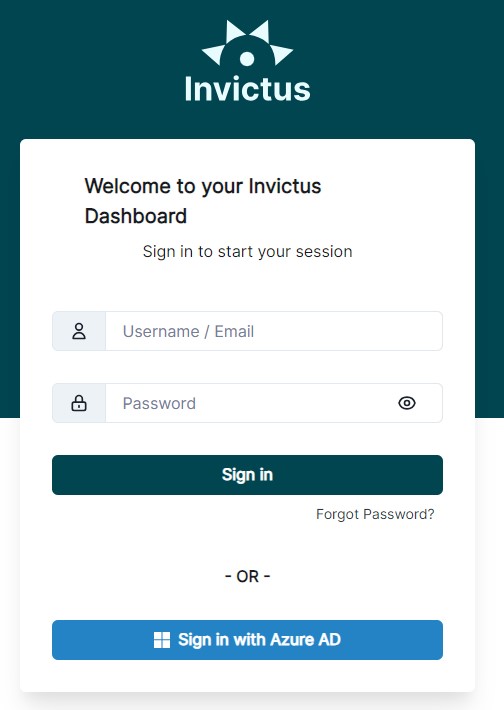
During the deployment of the system, an administrator account has been generated for your initial login to the Dashboard.
It is recommended to create a new System Admin user with your own email address after signing in for the first time. This will help during the Forgot Password procedure.
Follow the steps below to sign in to the Dashboard:
-
Navigate to the Dashboard by visiting
https://{yourdashboardurl}in your web browser. -
Enter the following credentials:
- Username:
admin - Password: (the
tempAdminPasswordavailable as an Azure Key vault secret in the accompanied deployed vault)
- Username:
-
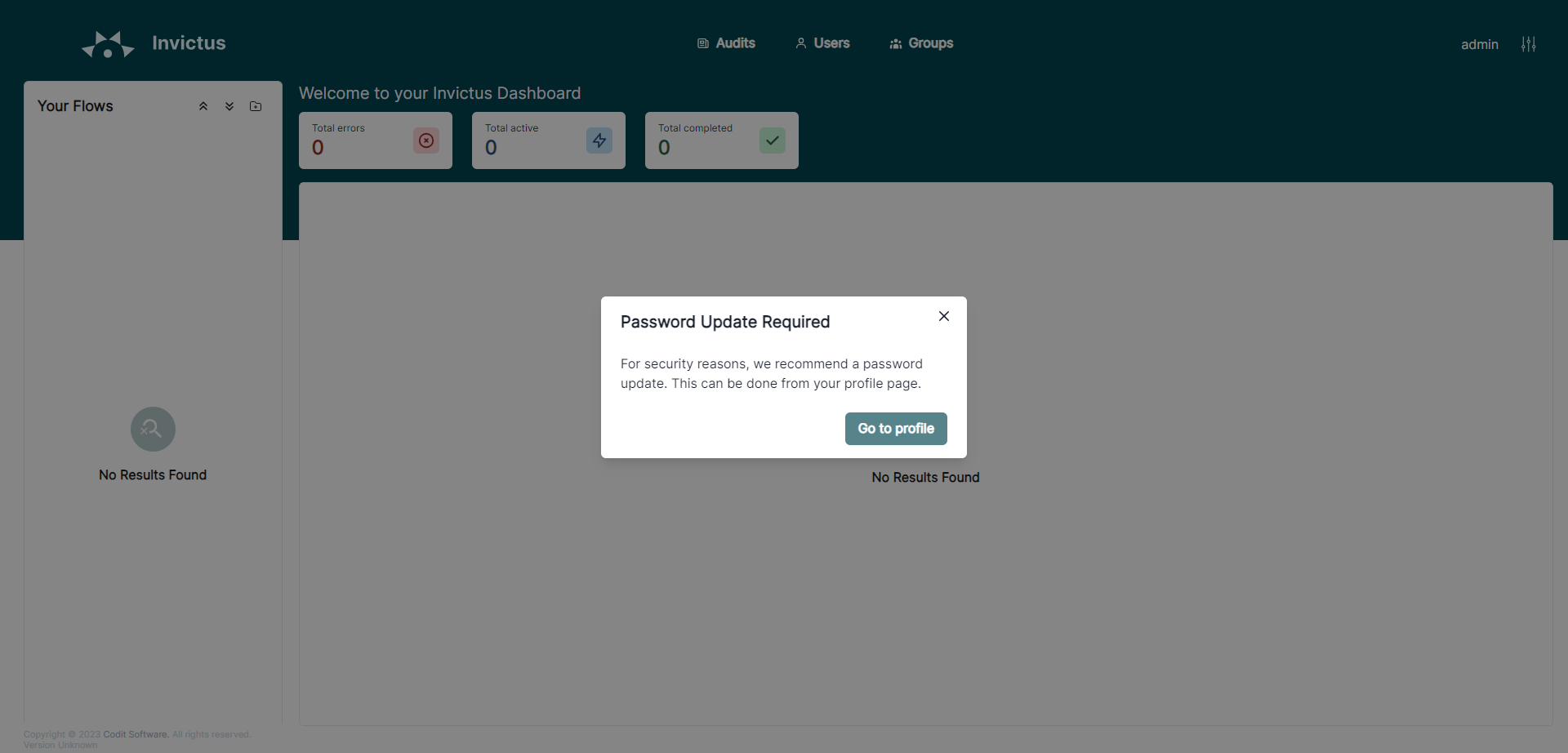
After successfully logging in, you will be prompted to reset your password to one of your choice.
-
🎉 Congratulations! You have logged into the Invictus Dashboard for the first time.
Follow these additional guides related to authentication and authorization: